Support / Content
Selling a Video in Two Resolutions
Shot a scene in 4K? You can sell it in two resolutions from one content set, for example 1080p and 4K, or 720p and 1080p. Fans pick the version they want when they buy, and each version has its own price.
Good to know: this is turned on per store. If you don't see Add another version on your content set's page, contact support to turn it on. The two videos must be different resolutions. Teammates need edit access to Content to add or remove a version.
Add the second version
Updated Nov 3, 2026
- Upload both videos as source videos on the Upload page, the same way you upload any video. Add the content set as usual with one of them (see Adding Content).
- Start with the higher resolution if you can. Fans stream the highest version. If you add a higher version later, fans keep streaming the current one until the new one finishes processing, usually within the hour.
-
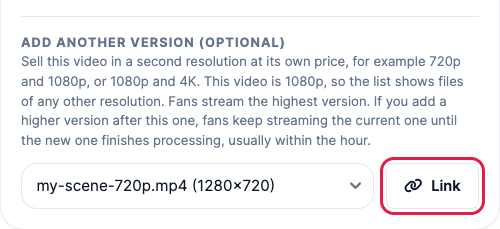
Open the content set. In the Source video card, under Add another version (optional), pick the other video and click Link. The list only shows videos of a different resolution than the one already linked.
-
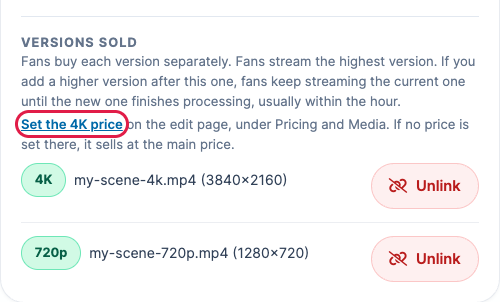
The card now lists both under Versions sold, highest first.
Set the price of each version
Updated Nov 3, 2026
- Click Set the 4K price under Versions sold (it names your higher version). It opens the edit page at Pricing and Media. You can also click Edit on the content set and scroll to that section.
- Content Purchase Price is the price of the lower version. Pick the higher version's price under its own field, for example 4K Version Price, then save.
- Until you set it, the higher version sells at the same price as the lower one.
If your site is membership only, there are no prices to set: members get the video with their membership.
What your fans see
Updated Nov 3, 2026
- On the video's page, fans pick the version from a list next to the buy button, with each version's price.

- Buy buttons elsewhere on your site add the lower version, or the higher one if the fan already owns the lower one.
- Each version is bought separately. A fan who bought one version can buy the other later.
- Fans download the version they bought. Orders and receipts name the version, for example "(4K)".
- Fans and members stream the highest version. Some sites stream at up to 1080p: there, a 4K version plays at 1080p and its full resolution is for downloading. The note in the Source video card tells you how your site streams.
Remove a version
Updated Nov 3, 2026
- In Versions sold, click Unlink next to the version and confirm. The other version stays, and the content set stays live.
- Fans can no longer buy or download the version you removed, including fans who already bought it, so only remove a version nobody has bought, or replace it right away.
If a video won't link
Updated Nov 3, 2026
- "Both videos are 1080p. The second video must be a different resolution." The two videos are the same resolution. Pick a video of another resolution.
- "That file has no known resolution, so it cannot be added as a second version." PaysiteManager couldn't read the video's size. Upload the video again, or contact support.
Still need help?
Our US-based team answers every ticket.